Ecommerce Order Automation with n8n and HubSpot

Ecommerce Order Automation with n8n and HubSpot
Picture an ordinary Tuesday at a small online shop. An order comes in. Someone has to open the CRM and check whether this customer already exists. Then create the order, email the customer, tell the team on Slack, and remember to follow up next week.
Four or five small jobs, none of them hard. But when the shop is busy, one gets skipped. The confirmation email goes out late. The team finds out about the order from the customer. The follow-up never happens, and a first-time buyer never becomes a second-time buyer.
Nobody failed here. The process just depended on people remembering things, and that’s a fragile way to run a shop.
Why this matters more than it used to
Most ecommerce owners already know their growth problem isn’t only getting orders. It’s what happens after the order arrives. Customers expect a quick confirmation. Teams need to see new orders without asking around. And the best moment to build a relationship is right after someone buys.
Each of those depends on small admin steps being done every time, for every order. As volume grows, those steps pile up on the same few people. Hiring more staff to click through the same checklist is an expensive answer.
Automation is the better one. And AI agents now make it possible to automate steps that used to need a human to make a call.
What we built
We built an order-handling agent on n8n, a workflow automation platform, and connected it to HubSpot. It takes order details through an API. To be upfront: this is a demo build, made to show what’s possible, not a system we’ve rolled out for a client yet. You can watch it run here:
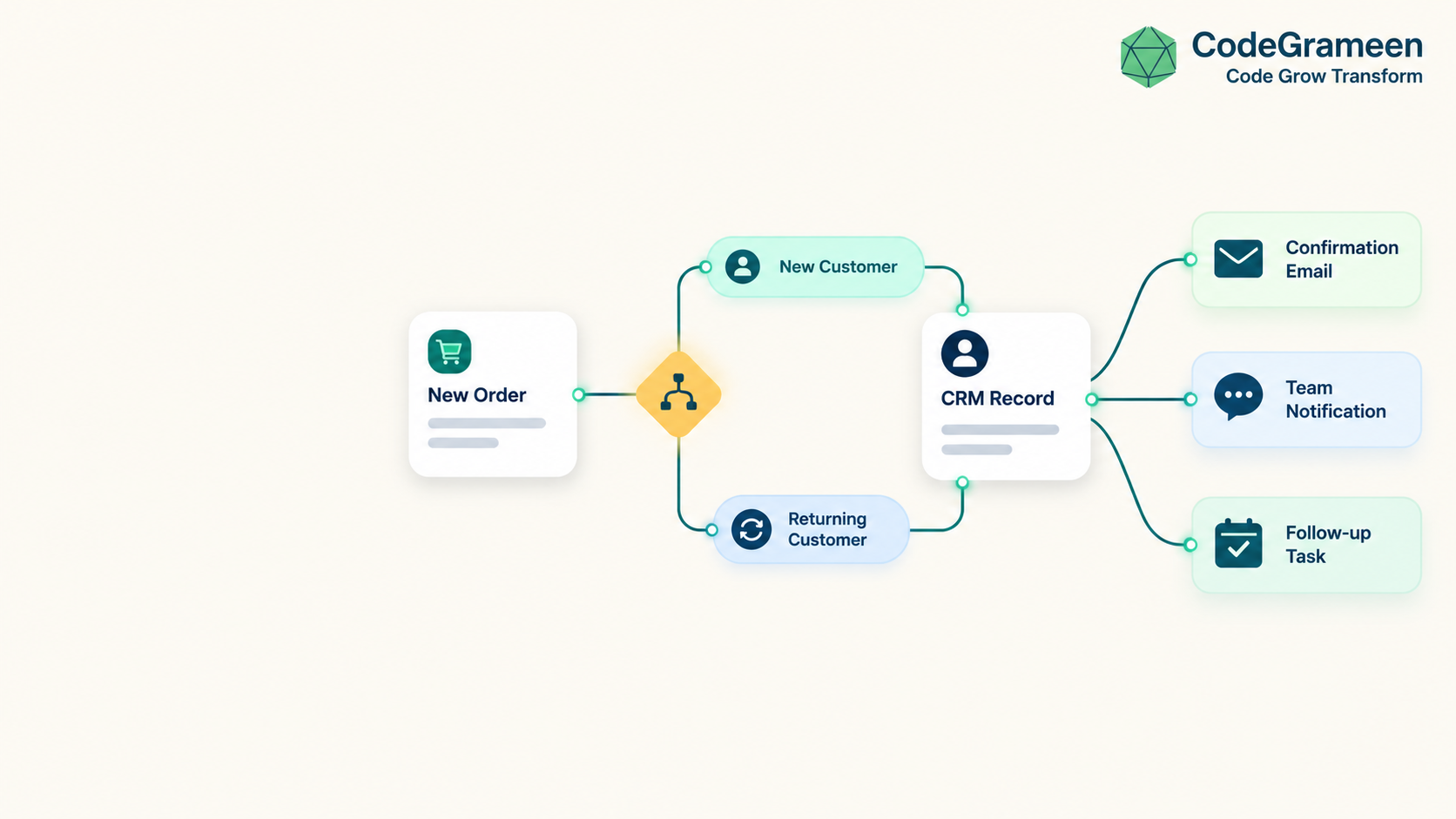
Here’s what happens when an order comes in:
- The agent receives the order details through the API.
- It checks whether the customer is new or existing. This is the step that used to need a human eye.
- It acts accordingly in HubSpot. A new customer gets a fresh record. An existing customer’s record is used, with no duplicate profile.
- It creates the order in HubSpot.
- It sends a confirmation email to the customer.
- It posts a Slack notification to your internal team.
- It adds a follow-up task in HubSpot so someone engages the customer after the purchase.
All of this happens without anyone touching a keyboard.
The best time to plan a follow-up is the moment the order lands, not three weeks later when you remember.
Why the new-versus-existing check matters
It sounds small, but this is where many CRMs quietly fill up with mess. Duplicate contacts, split order histories, and the same person getting a “welcome” email on their fifth purchase all come from systems that treat every order the same way.
An agent that recognises who is buying can handle each case properly. Your CRM stays clean and your customer data stays trustworthy. That makes every later step more reliable, from reports to retargeting.
How this helps an ecommerce shop day to day
Customers hear back immediately. The confirmation email goes out when the order is created, not when someone gets to it.
Your team stays in the loop. The Slack notification means packing, support and sales all see the order at the same time. No more “did that order come through?” messages.
Follow-ups actually happen. Because the task is created automatically, customer engagement stops depending on memory. Someone just works through their task list.
Your people do better work. The hours spent on data entry go back to things a workflow can’t do: talking to customers, fixing problems, and planning what to sell next.
Why this is the need of the hour
Ecommerce shops are being asked to do more with the same team: faster replies, cleaner data, better repeat-purchase rates. The shops that manage it won’t be the ones working longer hours. They’ll be the ones that stopped relying on manual steps for work that follows the same pattern every time.
You don’t need to automate everything at once. Order handling is a good place to start because it’s repetitive, it happens on every sale, and mistakes show up directly in the customer experience.
What we learned building it
The agent is the easy part to explain. The harder part is deciding what should happen after each order, and who owns it. A workflow can only automate a process you’ve clearly defined. So before building anything, we map the order journey on paper: what happens, who needs to know, and what comes next.
Since this is a demo, your real setup will differ. Your CRM fields, email tone and Slack channels will all need to match how your team works. That’s the part we’d shape with you.
A practical takeaway you can use today
Even if you never build an agent, try this. Write down everything that must happen after an order is placed, in order. Next to each step, mark whether it’s the same every time. The steps that are the same every time are your automation list. Start with one.
Want to see how this could fit your shop?
If your team is stuck copying order details between tools, we’re happy to look at your process and tell you honestly what’s worth automating and what isn’t. Reach out at codegrameen.com and we’ll set up a free workflow review.
Related articles
AI for Inbound Leads: Who Needs It and Who Doesn’t
Slow replies lose leads, even when the service is good. AI works best where enquiries are repetitive, frequent, and lead to a clear next s…
Why Google Reviews Matter, and How AI + WhatsApp Can Automate Them
This post covers why Google reviews matter, what the data says, and how a simple AI and WhatsApp system can handle the three jobs that most…